


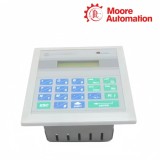


Plant-floor access to SLC 500 data tables
Allen-Bradley 1747-DTAM-E Data Table Access Module
Two-line LCD, 19-key sealed keypad and Monitor/Modify operating modes.
Product Description
Plant-floor personnel can view selected SLC 500 data without a programming terminal through the Allen-Bradley 1747-DTAM-E Data Table Access Module.
The front interface combines a 16-character by 2-line backlit LCD, a 19-key sealed membrane keypad and a bi-color communication/status indicator. Monitor and Modify modes let an application control whether values are only observed or can be changed.
A standard 1747-C10 cable carries power and communications between 1747-DTAM-E and an SLC 500 processor or DH-485 link coupler, while configuration parameters remain in nonvolatile memory.
Technical Specifications
| Technical Item | 1747-DTAM-E |
|---|---|
| Brand | Allen-Bradley |
| Product Type | SLC 500 Data Table Access Module |
| Brand Country | United States |
| Input Voltage | 18…30 V DC |
| Input Current | 104 mA maximum at 24 V DC |
| Inrush Current | 350 mA peak maximum |
| Display | 16 characters × 2 lines, backlit LCD |
| Keypad | 19-key sealed membrane with tactile feedback |
| Operating Modes | Monitor; Modify |
| Front Panel | 152.4 × 139.7 mm |
| Back Case | 127.0 × 101.6 × 63.5 mm |
| Operating Temperature | 0…55 °C |
| Relative Humidity | 5…95%, noncondensing |
| Interconnect Cable | 1747-C10 |
Operator Access & Modify Modes
Control whether values can only be seen or also changed
- Monitor mode supports observation of configured data without permitting the same level of value modification.
- Modify mode enables approved data changes from the keypad and should be governed by the machine operating procedure.
- The rear mode-change terminal and application configuration must agree with the intended operator authority.
- Use displayed data as an operating interface, not as a replacement for safety-rated controls.
LCD, Keypad & Fault Feedback
Use the front panel to separate display, keypad and communication faults
- The 16 × 2 backlit LCD has contrast adjustment for the installed environment.
- A 19-key sealed membrane keypad provides tactile feedback for navigation and numeric entry.
- The bi-color indicator reports operating mode and selected communication or fault states.
- Error 100, 200, 300 and 400 messages distinguish ROM, RAM, keypad and configuration-memory checks for targeted service.
Frequently Asked Questions
Why is 1747-DTAM-E readable but operators cannot change a displayed value?
Check whether the module is in Monitor rather than Modify mode and whether the configured item permits entry. Do not change the mode until the machine procedure confirms that operator modification is allowed.
What does an ERROR 300 message on 1747-DTAM-E indicate?
ERROR 300 identifies a keypad malfunction in the documented troubleshooting table. Reset the module as instructed, then inspect for contamination or physical key damage if the error returns.
Why does the 1747-DTAM-E backlight flash or the display fade?
Flashing can indicate insufficient or unregulated supply voltage, while temperature and humidity also affect LCD appearance. Measure the 18…30 V DC input under load and confirm the enclosure stays within the environmental limits.
Can 1747-DTAM-E be connected with an ordinary ribbon cable?
Use the specified 1747-C10 interconnect cable between the module and the SLC 500 processor or DH-485 link coupler. The cable carries both power and communications, so an unverified substitute can create simultaneous power and data faults.
How should an old 1747-DTAM-E configuration be preserved before replacement?
Record operating mode, displayed files, communication settings and any nonvolatile configuration details before removing the unit. Verify the replacement setup against the SLC application and test each permitted operator action.
Why does 1747-DTAM-E show a solid black LCD after a cabinet temperature rise?
The troubleshooting guidance associates a black background with an enclosure that is too hot. Restore the specified environment, allow the display to stabilize and adjust contrast only after the thermal cause is corrected.
Legacy Parts Support
Moore Automation
Help for installed systems that remain in service
Moore Automation sources discontinued and hard-to-find automation components used in mature production assets. Complete catalog identification is kept central because legacy families often contain visually similar but functionally different parts.
Send the complete part number and quantity so the requested variant remains clear from enquiry through quotation.
Recommended Products
- Beckhoff IE4132-0000
- SMC MXS12-50
- Siemens TXM1.8U
- ABB 1SAP180100R0001
- Allen-Bradley TLY-A2540P-BJ62AA
- Honeywell XF821A
- Festo MS6-FRM-1/2-Y
- Schneider EER31500
- WAGO 2002-2409
- B&R X67BC8321.L12
- Beckhoff EL4122
- Siemens SEM62.2
- ABB 2TLA020051R5100
- Allen-Bradley 1794-PS3
- Honeywell TC810N1013
- Festo ADVUL-32-80-P-A
- Schneider XPSAC5121
- WAGO 787-840
- B&R 2BP201.4
- Weidmüller WDK2.5PE
- Siemens TXM1.6R
- ABB 1SDA066317R1
- Allen-Bradley 1738ADN12
- Honeywell 73091B
- Festo ADVU-16-25-P-A-S2
- Schneider LRD340
- WAGO 855-4101/200-001
- B&R 7IF371.7
- Omron ZEN-PA03024
- Siemens 3RH2344-1DF40-0KA0
- ABB 1SDA051370R1
- Allen-Bradley 1746-OX8
- Honeywell T6865H2WB
- Festo MHE2-MS1H-5/2-QS-4-K
- Schneider BMXXBP0400
- WAGO 787-876
- B&R X20BT9400
- Siemens 3RV1901-1E
- ABB 1SVR427014R0000
- Allen-Bradley 856T-B24Q10C
- Honeywell XFC3A06001
- Festo ADVUL-40-80-PA
- Schneider LC1D09Q7
- WAGO 787-1675
- Finder 60.13.8.230.0040
- Siemens 3RT2517-1AK60
- ABB 1SDA051368R1
- Allen-Bradley 1732EIB16M12SOEDR
- Honeywell VC6013AJ1000T
- Festo CRDSNU-25-90-P-A
- Schneider BMXDDO1602
- WAGO 787-1668
- Herion 0882100
- Siemens 3SK1111-1AB30
- ABB 1SBL161001R8410
- Allen-Bradley 1734ADN
- Honeywell XF523A
- Festo ADVU-40-25-A-P-A
- Schneider TSXRKY6
- WAGO 750-301
Contact Us
Send the complete part number and quantity for a quotation.




No related record found