

Welcome to Moore Automation Limited

0
Loadding...
 

sales@mvme.cn    Phone: +86 18030175807

Home>SIEMENS>Siemens 6ES7274-1XF30-0XA0 / 6ES7274-1XH30-0XA0 | SIMATIC S7-1200 CPU Simulator Accessories
Siemens 6ES7274-1XF30-0XA0 / 6ES7274-1XH30-0XA0 | SIMATIC S7-1200 CPU Simulator Accessories

Siemens 6ES7274-1XF30-0XA0 / 6ES7274-1XH30-0XA0 | SIMATIC S7-1200 CPU Simulator Accessories Item NO.: 2927235

Write a Review
US$ 1.00
Quantity
Stock ( 28 )

Copy and share this link on social network or send it to your friends

Copy
Request Price & AvailabilitySend the part number and quantity. Our team will confirm stock, condition, lead time and the best quotation.
  • MOQ: 1 piece
  • International shipping
  • 1-year warranty on eligible items
  • Fast response during business hours
Product Name Siemens 6ES7274-1XF30-0XA0 / 6ES7274-1XH30-0XA0 | SIMATIC S7-1200 CPU Simulator Accessories
Item NO. 2927235
Weight 0.1 kg = 0.2205 lb = 3.5274 oz
Category SIEMENS
Brand SIEMENS
Creation Time 2026-10-26

Siemens 6ES7274-1XF30-0XA0 / 6ES7274-1XH30-0XA0 | SIMATIC S7-1200 CPU Simulator Accessories
SIEMENS VERIFIED PRODUCT RECORD

Siemens 6ES7274-1XF30-0XA0 / 6ES7274-1XH30-0XA0 | SIMATIC S7-1200 CPU Simulator Accessories

Two plug-in simulator boards for checking digital CPU inputs during S7-1200 commissioning and training.

Models6ES7274-1XF30-0XA0 / 6ES7274-1XH30-0XA0
ProductSIMATIC S7-1200 CPU Simulator Accessories
FamilySiemens automation
01

Product Introduction

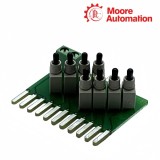
Siemens 6ES7274-1XF30-0XA0 and 6ES7274-1XH30-0XA0 are S7-1200 simulator accessories used with compatible CPU variants. The 1XF30 board provides the 8-position simulator version, while the 1XH30 board provides the 14-position version.

During a check, Siemens 6ES7274-1XF30-0XA0 or Siemens 6ES7274-1XH30-0XA0 is fitted at the CPU simulator interface so the input points can be actuated without building a separate field-contact panel. The selected board must match the CPU family and available simulator position.

The two order numbers are not interchangeable by label alone: Siemens 6ES7274-1XF30-0XA0 is associated with the 1211C/1212C simulator arrangement, while Siemens 6ES7274-1XH30-0XA0 is associated with the 1214C/1215C arrangement. Keep the exact CPU and simulator combination in the project record.

Black and white 3D line drawing exterior view of Siemens 6ES7274-1XF30-0XA0 / 6ES7274-1XH30-0XA0
02

Specification Details

Technical item6ES7274-1XF30-0XA06ES7274-1XH30-0XA0
Brand
Siemens
Model
6ES7274-1XF30-0XA0
6ES7274-1XH30-0XA0
Product Name
S7-1200 8-position simulator
S7-1200 14-position simulator
Country
Germany
Compatible CPU Group
CPU 1211C / 1212C
CPU 1214C / 1215C
Simulator Positions
8
14
Accessory Type
Digital input simulator
Mounting Role
CPU simulator interface
Use
Input-point actuation
Order Identity
1XF30 suffix
1XH30 suffix
03

Installation Highlights

Installation sequence

Installation of Siemens 6ES7274-1XF30-0XA0 or Siemens 6ES7274-1XH30-0XA0 is a controlled commissioning task: the CPU variant is confirmed first, the simulator is seated with power removed, and each switch is then proved against the expected input address.

1 · Verify and isolate

Confirm the exact CPU type and select Siemens 6ES7274-1XF30-0XA0 for the 1211C/1212C arrangement or Siemens 6ES7274-1XH30-0XA0 for the 1214C/1215C arrangement. Remove power before fitting the accessory.

2 · Seat without forcing

Align the simulator with the intended CPU interface and press it evenly into place. Do not bend contacts or use a switch bank whose width and point count do not match the CPU.

3 · Prove the input map

Restore power, move one switch at a time and compare the CPU indication with the downloaded address table. Stop if a switch operates an unexpected point; correct the hardware selection or project mapping before continuing.

04

System Integration

System relationship

Siemens 6ES7274-1XF30-0XA0 and Siemens 6ES7274-1XH30-0XA0 replace temporary field contacts only at the CPU simulator interface; the CPU input image and the user program remain the path that interprets each simulated state.

CPU compatibility

The 8-position simulator belongs with the smaller CPU group, while the 14-position simulator belongs with the larger CPU group. Mechanical fit and input count must agree with the exact CPU.

Signal path

A switch change is presented to the corresponding CPU input, then read by the process image and application logic. It does not generate an analog value or create additional I/O addresses.

Commissioning boundary

Use the simulator to prove input mapping and program response before connecting field devices. Record the simulator order number with the CPU so later tests reproduce the same point layout.

05

Product Questions

Why does Siemens 6ES7274-1XF30-0XA0 not actuate every input on a 1214C CPU?

Siemens 6ES7274-1XF30-0XA0 is the 8-position simulator associated with the 1211C/1212C arrangement. Use the simulator order number matched to the CPU family instead of assuming the switch count is universal.

What is the difference between Siemens 6ES7274-1XF30-0XA0 and 6ES7274-1XH30-0XA0?

Siemens 6ES7274-1XF30-0XA0 provides the 8-position arrangement, while Siemens 6ES7274-1XH30-0XA0 provides the 14-position arrangement. Their compatible CPU groups are different and should remain distinct in the project record.

How can a simulator fault be separated from a program-address error?

With Siemens 6ES7274-1XF30-0XA0 or Siemens 6ES7274-1XH30-0XA0, actuate one switch and watch the corresponding CPU input address. If the physical state changes but the program does not, check the address mapping before replacing the accessory.

Can Siemens 6ES7274-1XH30-0XA0 be used as an 8-position board?

Siemens 6ES7274-1XH30-0XA0 is the 14-position simulator for the 1214C/1215C arrangement. Do not treat the suffix as a generic switch-count option; select the board that matches the CPU interface.

Why should the exact simulator order number be retained after a training-panel change?

Keeping Siemens 6ES7274-1XF30-0XA0 or Siemens 6ES7274-1XH30-0XA0 with the CPU record preserves the expected input count and prevents a different simulator from being wired to the wrong project layout.

What should be checked when one simulator position remains permanently on?

For Siemens 6ES7274-1XF30-0XA0 or Siemens 6ES7274-1XH30-0XA0, compare the switch position, input address and CPU diagnostic state one point at a time. A stuck indication can come from the simulator position, connector seating or the downloaded logic.

06

Advantageous Brands

Moore Automation

https://www.mvme.cn

Moore Automation covers Siemens SIMATIC S7-1200 and S7-1500 control hardware alongside ABB, Allen-Bradley, GE, Honeywell, Mitsubishi, Omron, Schneider Electric and other industrial ranges.

The product scope includes PLC CPUs, signal boards, I/O modules, communication processors, drives, HMI and monitoring parts. Exact order numbers, quantities and destinations remain attached to each enquiry.

PLC brandsSiemens, Schneider Electric, Rockwell Automation
Control rangesS7-1200 and S7-1500 families
I/O coverageDigital, analog and communication modules
Record continuityModel and quantity stay together
08

Sales Enquiries

Contact Moore Automation

ManagerLeonia

No related record found

Copyright © 2004–2026 www.mvme.cn. All rights reserved.

Disclaimer: Moore Automation Limited is an independent reseller and is not an authorized distributor or representative of the manufacturers featured on this website. Product names and trademarks belong to their respective owners.