



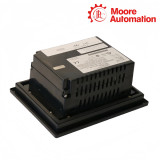
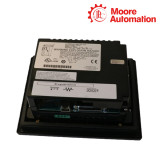

GE Fanuc IC754VSB06CTD / IC754VGB06CTD / IC754VBB06CTD 6-inch QuickPanel View Color Touch Terminals
Product Description
IC754VSB06CTD and IC754VGB06CTD and IC754VBB06CTD are QuickPanel View configurations with distinct complete ordering identities. All three models provide a compact color touchscreen operator interface in the QuickPanel View family. They run machine-visualization projects and connect the operator display to the configured controller through the terminal’s installed communication paths.
The shared CTD designation identifies the color-touch display class, while VSB, VGB and VBB distinguish separate factory ordering configurations. These suffixes remain part of the product identity used by the project target and service image.
The models can therefore share a general panel role without being treated as one interchangeable terminal. Software load, communication options and complete nameplate designation must be matched to the installed application.
Technical Specifications
Shared specifications
- Product family
- QuickPanel View
- Display class
- 6-inch color touchscreen
- Operator input
- Touch
- Application
- Machine-level visualization
- Project environment
- Proficy / CIMPLICITY Machine Edition family
- Mounting
- Panel installation
Model-specific differences
- Display suffix
- CTD color-touch configuration
- Order line
- VSB configuration
- Display suffix
- CTD color-touch configuration
- Order line
- VGB configuration
- Display suffix
- CTD color-touch configuration
- Order line
- VBB configuration
Migration Inventory

-
Capture the project
Keep the editable source, target type and driver configuration—not only screenshots of running displays.
-
Capture the hardware
Photograph the rating plate, rear connector use, bezel and panel opening.
-
Capture the network
Record IP data, serial electrical mode, node addresses and cable pinout.
Three Suffixes, One Selection Discipline
Shared configuration
Model-specific configuration
Color counterpart in the VSB ordering line.
Separate color configuration; confirm software load and communications options.
Basic-line color configuration; do not infer interchangeability from screen size alone.
FAQ
What must be confirmed before substituting among the three 6-inch color orders for IC754VSB06CTD / IC754VGB06CTD / IC754VBB06CTD?
Confirm the complete suffix, target type, software load, communication options, bezel and panel opening. Shared color display size is not enough.
Why should the running project be exported before the old terminal fails for IC754VSB06CTD / IC754VGB06CTD / IC754VBB06CTD?
A replacement can only be commissioned efficiently when the editable project and its communication drivers are available. Screenshots are not a project backup.
Which cabinet details should be photographed during the survey for IC754VSB06CTD / IC754VGB06CTD / IC754VBB06CTD?
Capture the rating plate, front bezel, cutout edge, gasket, mounting clips, rear connectors and cable labels.
How can a correct project still lose controller communications after transfer for IC754VSB06CTD / IC754VGB06CTD / IC754VBB06CTD?
The IP address, serial electrical mode, driver, node and cable pinout may not match the old terminal. Preserve each parameter explicitly.
What should an operator test after a color-terminal replacement for IC754VSB06CTD / IC754VGB06CTD / IC754VBB06CTD?
Check touch alignment, color-coded states, alarms, navigation, data entry and every controller connection.
Why are IC754VSB06CTD, IC754VGB06CTD and IC754VBB06CTD kept as separate order identities?
Their suffixes identify different configurations. Quote and restore against the complete model instead of collapsing them into one generic QuickPanel View.
Recommended Products
Request Product Information
- Manager
- Leonia
- sales@mvme.cn
- +8618030175807



No related record found