




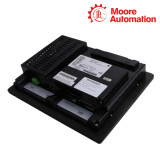

GE Fanuc IC754VBF12CTD / IC754VBI12CTD 12-inch QuickPanel View Color Touch Terminals
Product Description
IC754VBF12CTD and IC754VBI12CTD are QuickPanel View configurations with distinct complete ordering identities. The two models provide a large-format color operator interface for displaying process values, alarms and machine controls. Both belong to the QuickPanel View family and execute a configured Machine Edition visualization project.
Their common 12-inch CTD display class defines the basic color-touch operator format. The VBF and VBI order prefixes identify different configurations whose software target, interface setup and installed options remain tied to the complete model number.
The models may occupy the same functional position in a control system, but replacement requires confirmation of the exact project target, panel opening, rear clearance and communication arrangement.
Technical Specifications
Shared specifications
- Product family
- QuickPanel View
- Display class
- 12-inch color
- Active diagonal
- 12.1-inch class
- Operator input
- Touchscreen
- Application
- Industrial HMI visualization
- Mounting
- Panel mounted
Model-specific differences
- Display suffix
- CTD color-touch configuration
- Order line
- VBF configuration
- Display suffix
- CTD color-touch configuration
- Order line
- VBI configuration
Enclosure and Project Readiness

-
Opening and gasket
Inspect the panel opening, gasket condition and clamping hardware before choosing a replacement.
-
Rear service space
Allow room for power and communication plugs without bending cables against the enclosure.
-
Project compatibility
Confirm the exact target family and runtime revision before attempting a download.
Mechanical Commonality, Configuration Difference
Shared configuration
Model-specific configuration
VBF 12-inch color order configuration.
VBI 12-inch color order configuration.
FAQ
Why should the panel opening be measured for both IC754VBF12CTD and IC754VBI12CTD?
The same 12-inch display class does not by itself prove identical bezel, cutout or rear-clearance requirements for every order configuration.
What distinguishes the VBF and VBI orders during purchasing for IC754VBF12CTD / IC754VBI12CTD?
The complete suffix identifies the ordered configuration. Preserve it and verify software, communications and installed options rather than ordering by screen size.
Which files should accompany the replacement terminal for IC754VBF12CTD / IC754VBI12CTD?
Keep the editable project, compiled runtime, target definition, communication settings, retained data and license information.
How can rear service space cause a commissioning delay for IC754VBF12CTD / IC754VBI12CTD?
Power and communication plugs need room to seat and cables need a safe bend radius; a shallow enclosure can stress or block them.
What should be checked if the screen works but values do not update for IC754VBF12CTD / IC754VBI12CTD?
Verify controller driver, physical port, addressing, cable pinout and project target. The display subsystem can run while the control link is wrong.
How should touch operation be validated on a 12-inch replacement for IC754VBF12CTD / IC754VBI12CTD?
Calibrate the panel, test edge and corner targets, and exercise critical commands under controlled conditions.
Recommended Products
Request Product Information
- Manager
- Leonia
- sales@mvme.cn
- +8618030175807
No related record found