

01
Two-port line structure
Both RJ45 connections on X20IF10E1-1 terminate at the internal switch. A daisy-chain line can therefore continue through the module without adding an external switch at that station.
Welcome to Moore Automation Limited

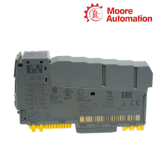
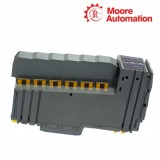
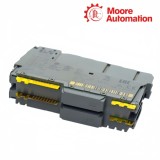

|
Copy and share this link on social network or send it to your friends
Copy| Product Name | B&R X20IF10E1-1 PROFINET IO Controller Interface Module |
| Item NO. | 2943168 |
| Weight | 0.1 kg = 0.2205 lb = 3.5274 oz |
| Category | B&R |
| Brand | B&R |
| Creation Time | 2026-11-19 |
PROFINET IO / CONTROLLER INTERFACE
B&R X20IF10E1-1 is an X20 interface module with an electrically isolated PROFINET IO controller (master) interface. Installed in an X20 PLC or the expandable X20BC1083 bus controller, X20IF10E1-1 manages configuration, cyclic process data, alarms and diagnostic exchange between the B&R control system and decentralized PROFINET IO devices.
Network traffic enters X20IF10E1-1 through either of its two shielded RJ45 ports. The ports feed an integrated switch, so one connection can link the upstream controller network while the second continues the line to another station. The netX100 controller and 8 MB SDRAM process this traffic without placing the PROFINET IF1 and IF2 circuits on the PLC electrical potential.
Within Automation Studio, X20IF10E1-1 assigns controller and device names, IP settings, process-data addresses, port behavior, update times and watchdog times. READY/RUN, SF, BF and L/A indicators separate module, configuration, fieldbus and link conditions, giving commissioning personnel a direct path from a visible status to the corresponding network or device setting.
| Brand | B&R |
|---|---|
| Model | X20IF10E1-1 |
| Product Name | X20 PROFINET IO Controller Interface Module |
| Country | Austria |
| Primary Role | PROFINET IO controller (master) |
| Fieldbus Interface | PROFINET IO |
| Network Ports | 2 shielded RJ45 ports with integrated switch |
| Physical Layer | 100BASE-TX |
| Transfer Rate | 100 Mbit/s |
| Maximum Segment Length | 100 m between two stations |
| Controller and Memory | netX100 with 8 MB SDRAM |
| Electrical Isolation | PLC isolated from PROFINET IF1 and IF2 |
| Power Consumption | 2 W |
| Installation Slot | X20 PLC or expandable X20BC1083 bus controller |
| Operating Temperature | -25 to 60°C horizontal; -25 to 50°C vertical |
X20IF10E1-1 connects the X20 controller to PROFINET devices through a switched Ethernet path and maintains separate routes for configuration, cyclic data and alarms.
Both RJ45 connections on X20IF10E1-1 terminate at the internal switch. A daisy-chain line can therefore continue through the module without adding an external switch at that station.
X20IF10E1-1 acts as the PROFINET IO controller and exchanges process data with configured devices using the producer-consumer model. Process data and alarms use real-time communication.
Third-party PROFINET devices are added to the X20IF10E1-1 project with their GSDML device descriptions. Station names, IP addresses and process-data offsets then bind each configured device to the controller scan list.
Automation Studio organizes the operating behavior of X20IF10E1-1 at controller, device, port and process-image level instead of treating the network as one undifferentiated connection.
Bus communication on X20IF10E1-1 can start automatically or under application control. The selected mode determines whether cyclic exchange begins during controller startup or waits for the program command.
Each device assigned to X20IF10E1-1 receives its own update time and watchdog time. The watchdog value must be a multiple of the update time so the device can identify missing cyclic data on the intended schedule.
The IOPS interface of X20IF10E1-1 allows the application to distinguish valid and invalid input data and to declare output data valid or invalid. This status is handled separately from the module's software watchdog.
X20IF10E1-1 can establish a physical link before the configured station name, IP settings and device configuration match the connected PROFINET device. Check BF and SF states, then compare the device table and IP address table with the actual device.
On X20IF10E1-1, SF identifies an invalid configuration or system error, while BF identifies missing configured I/O or loss of the remote-station link. The different LEDs direct the check toward project configuration or the fieldbus connection.
Import the device's GSDML description, add the device beneath X20IF10E1-1, and assign its station name, IP parameters and process-data mapping. Data exchange begins only when the configured identity matches the physical station.
For the affected device on X20IF10E1-1, compare its update time with its watchdog time. The watchdog must be a multiple of the update time and long enough to cover the configured cyclic exchange without reporting missing data prematurely.
When FSU is enabled for X20IF10E1-1, set the connected interfaces to the same MAU type and use 100BASETXFD for fast startup. Mismatched MAU settings prevent the adjacent devices from establishing the link.
Before exchanging X20IF10E1-1, retain the Automation Studio project values for controller and station names, IP settings, device activation, process-data addresses, port settings and device timing. These values define how the replacement module resumes the existing PROFINET configuration.
Moore Automation keeps each enquiry tied to the exact manufacturer and model reference. The same contact follows the request through specification review, commercial communication, packing records and shipment tracking.


Moore Automation Sales Team
Copyright © 2004–2026 www.mvme.cn. All rights reserved.
Disclaimer: Moore Automation Limited is an independent reseller and is not an authorized distributor or representative of the manufacturers featured on this website. Product names and trademarks belong to their respective owners.
No related record found